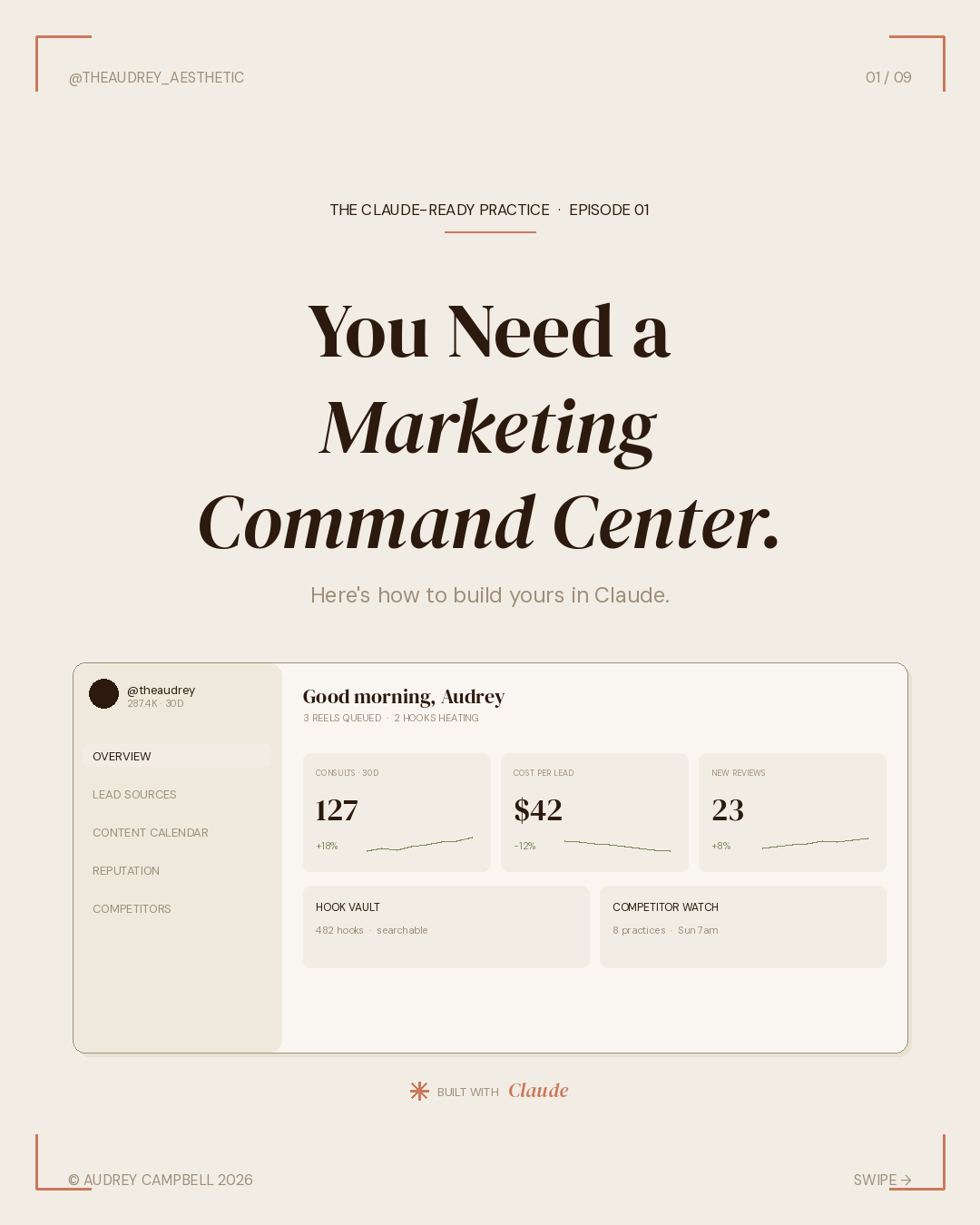
Your marketing runs on five tools, three logins, and a retainer.
Later for scheduling. Birdeye or Podium for reviews. A spreadsheet for lead sources that nobody updates. A marketing agency that bills monthly and reports quarterly. A competitor research process that lives in your screenshots folder.
None of these tools talk to each other. None of them tell you which channel actually books consults. None of them write in your voice. And the agency? They don't know your patients.
This post shows you how to replace all of it with one dashboard, built in Claude, in about a weekend. Free.
This is Episode 01 of The Claude-Ready Practice. A new series for owners who want to stop treating AI as a novelty and start treating it as infrastructure. Each episode is a single build, with the prompts, the connectors, and the screenshots. Save the ones you'll use. Skip the ones you won't.
What you're building
A Marketing Command Center. One dashboard, four modules, built in Claude using the connectors and skills you already have access to.
The four modules:
- Lead Source Attribution — which channels actually book consults, not just generate clicks.
- Content Calendar — weekly posts written in your practice voice, scheduled across Instagram, TikTok, and YouTube Shorts.
- Reputation Pipeline — pulls new Google reviews daily, drafts responses in voice, flags anything 3 stars or below.
- Competitor Watch — tracks 5 to 8 competitor practices, surfaces their top-performing content weekly.
Each module gets its own prompt. You paste, Claude builds, you refine. The whole thing lives in your Claude project so it stays in context across sessions, across weeks, across whatever else you're working on. It does not forget. It does not need to be retrained every Monday.
The first prompt
Open Claude. Start a new project called "Marketing Command Center." Paste this:
// PASTE THIS INTO CLAUDE
Build me a Marketing Command Center for my aesthetic practice with these four modules:> Lead Source Attribution — track every consult booking by source. Show which channels convert, not just which generate volume.> Content Calendar — weekly posts scheduled across Instagram, TikTok, and YouTube Shorts. Captions auto-generated in my practice voice.> Reputation Pipeline — pull new Google reviews daily. Draft responses in voice. Flag anything 3 stars or below for human review.> Competitor Watch — track 8 competitor practices. Surface their top 3 posts weekly with hook, format, and view count.Pull live data from my CRM, my ad accounts, and my scheduling tool. Create a CLAUDE.md file in the project that documents the stack and any decisions you make.
Claude will ask clarifying questions. Answer them. The questions are the build.
This is the part most posts about AI skip. Claude is not magic. It is a conversation. The first prompt sets the architecture. The next ten minutes of questions shape what gets built. The more honest you are about your current workflow, your voice, your competitors, the better the output. Garbage in is still garbage out. Specificity in is leverage out.
Module 01 — Lead Source Attribution
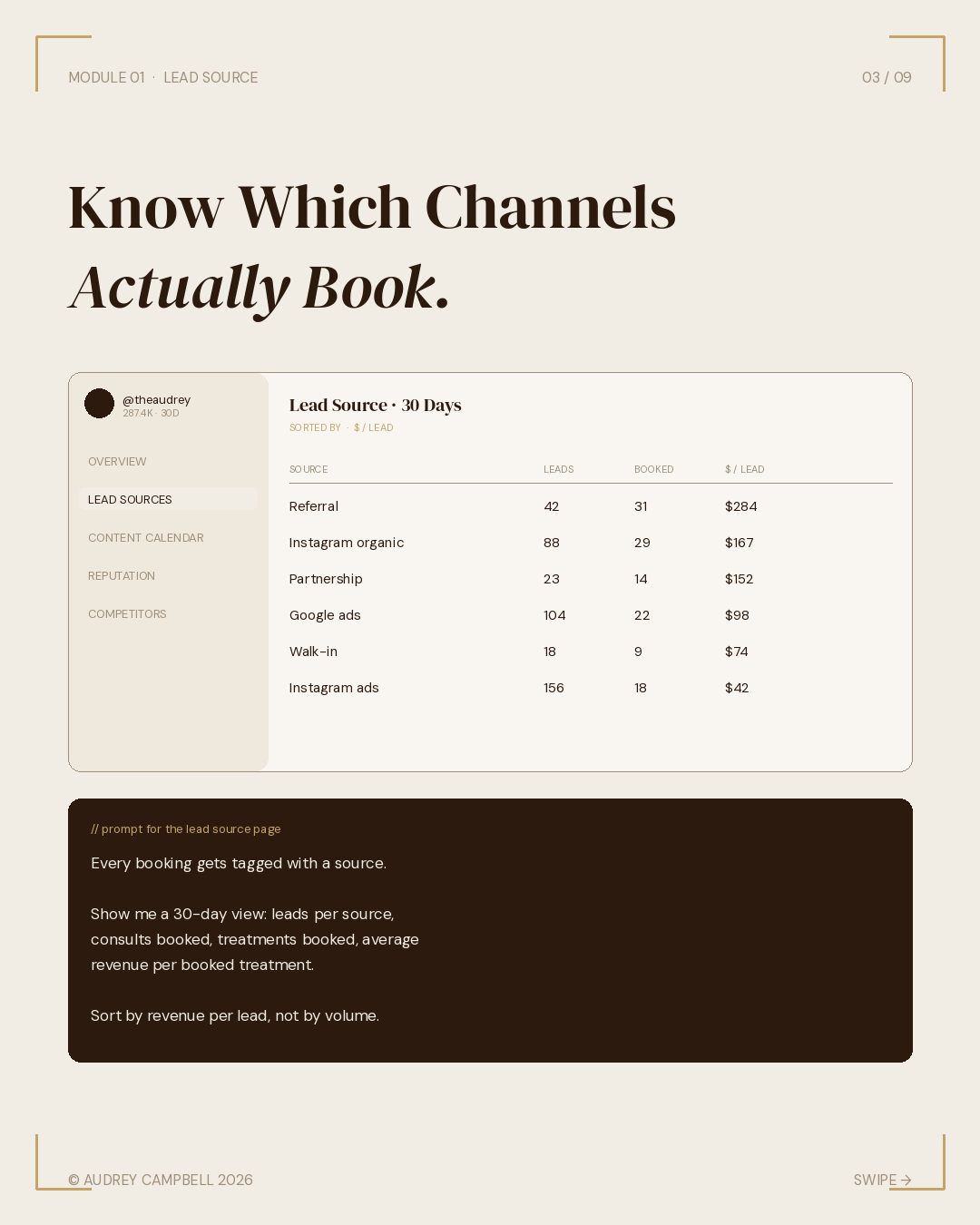
This is the module owners feel most blind on. You spend money on Instagram ads, Google ads, partnerships, referrals, and walk-ins, and at the end of the month, you can tell me revenue but not which channel produced it. You can tell me consult volume but not which source converts. You can tell me what your agency reports but not what's actually true.
The fix is simple. Every consult booking gets tagged at intake. Claude tracks the tag, joins it to the booking outcome, and shows you which channels actually convert versus which just generate noise.
// PROMPT FOR THE LEAD SOURCE PAGE
Build the Lead Source Attribution page.Every consult booking gets tagged with a source: Instagram organic, Instagram ads, Google ads, referral, walk-in, partnership, other.Show me a 30-day view: number of leads per source, number that booked a consult, number that booked a treatment, average revenue per booked treatment.Sort by revenue per lead, not by volume. I want to see which channel is actually worth the spend.
Once this is running, the conversations with your marketing agency change. Instead of asking "how did Instagram do this month," you ask "why did Instagram ads cost me $42 per lead while referrals brought in $284." That is a different conversation. Owners who run this for 90 days find out their marketing spend is misallocated by a factor of three or four. Some of them find out the agency is the most expensive lead source they have.
Lead source attribution is the single highest-leverage module in this stack. If you build nothing else, build this.
Module 02 — Content Calendar
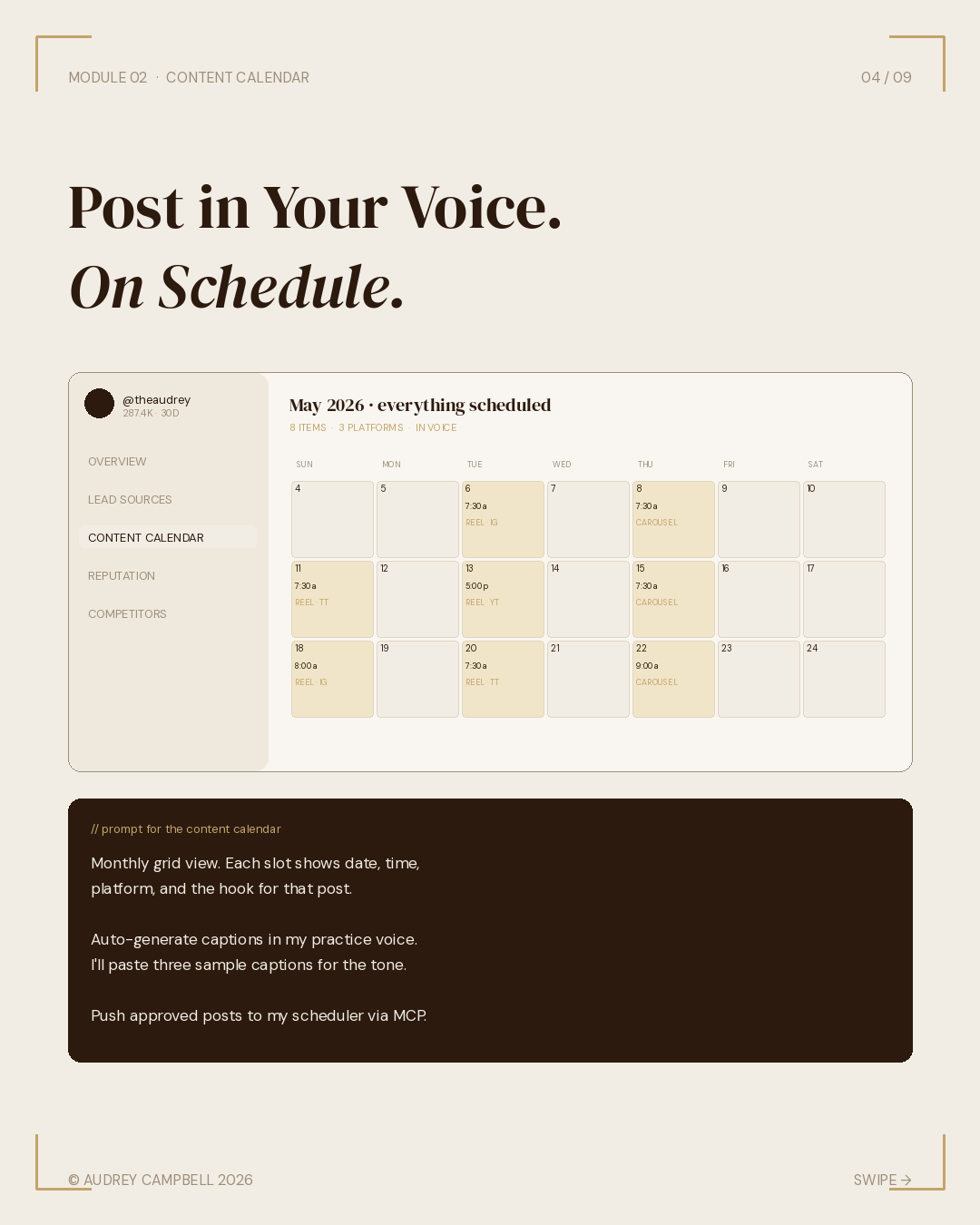
Most practices either post three times a week with no plan or pay an agency to post three times a week with no plan. The calendar fixes both.
You give Claude your practice voice. Three or four sample captions you have written. The services you want to feature this month. Any seasonal pushes. Claude drafts a week of content, in voice, with platform-specific formatting. You approve or edit. Then it goes on the calendar.
// PROMPT FOR THE CONTENT CALENDAR
Build the Content Calendar page.Monthly grid view. Each slot shows the date, time, platform (Instagram, TikTok, YouTube Shorts), and the hook for that post.Auto-generate captions in my practice voice. I'll paste three sample captions so you have the tone.Click any slot to see the full caption and any visual notes in a side panel. Push approved posts to my scheduler via MCP.
Voice training is the unsexy part. The system is only as good as the three sample captions you feed it. If your samples are good, the output is good. If your samples sound like every other med spa caption on Instagram, the output will too. This is where the work is.
And this is also where the leverage compounds. Train the voice once. Use it forever. Every new staff member who joins the practice can write in your voice from day one because the system already has it.
Module 03 — Reputation Pipeline
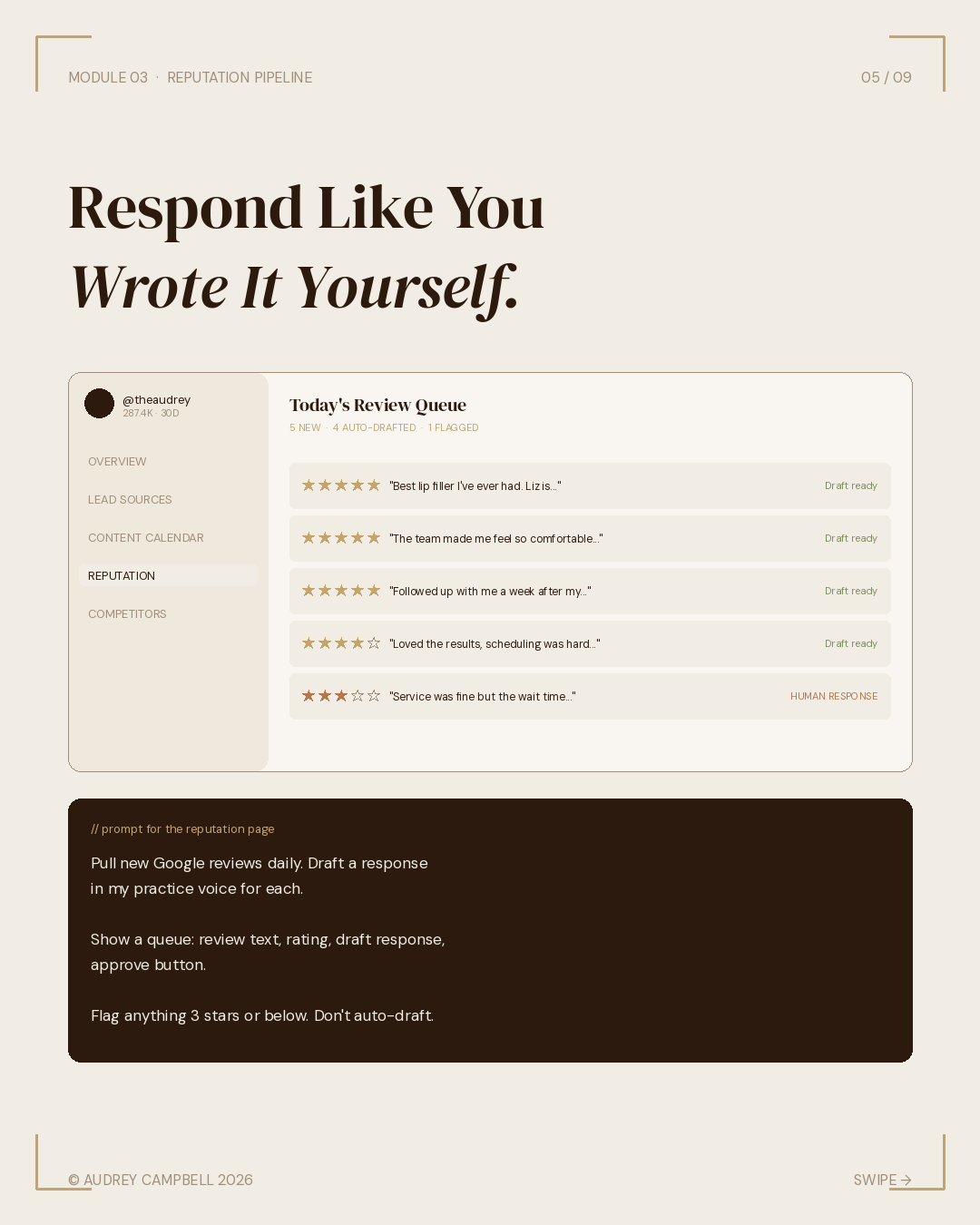
Reviews are revenue. Most practices know this and still respond to reviews two weeks late, in a tone that sounds nothing like them, when they remember at all. Or worse, they pay a reputation management platform $400 a month to send template responses that everyone can tell are template responses.
Claude pulls new Google reviews every morning, drafts a response in your voice, and queues them for one-click approval. Anything 3 stars or below gets flagged and held. Those get human eyes, not auto-response.
// PROMPT FOR THE REPUTATION PAGE
Build the Reputation Pipeline page.Pull new Google reviews daily. For each review, draft a response in my practice voice (use the same sample captions for tone).Show a queue: review text, star rating, draft response, and an approve button.Flag anything 3 stars or below. Don't auto-draft for those. Surface them with a note: "human response required."
The 3-star-and-below rule is non-negotiable. AI-drafted responses to negative reviews are how practices get into PR situations. A 2-star review that mentions a treatment outcome needs a human who knows the patient, knows the chart, knows what to say and what to never say in writing. The system flags. The human responds. That's the line.
Module 04 — Competitor Watch
You already do this manually. You screenshot their reels. You note what is working. You forget what you saw a week later. You promise yourself you'll start a swipe file and you never do.
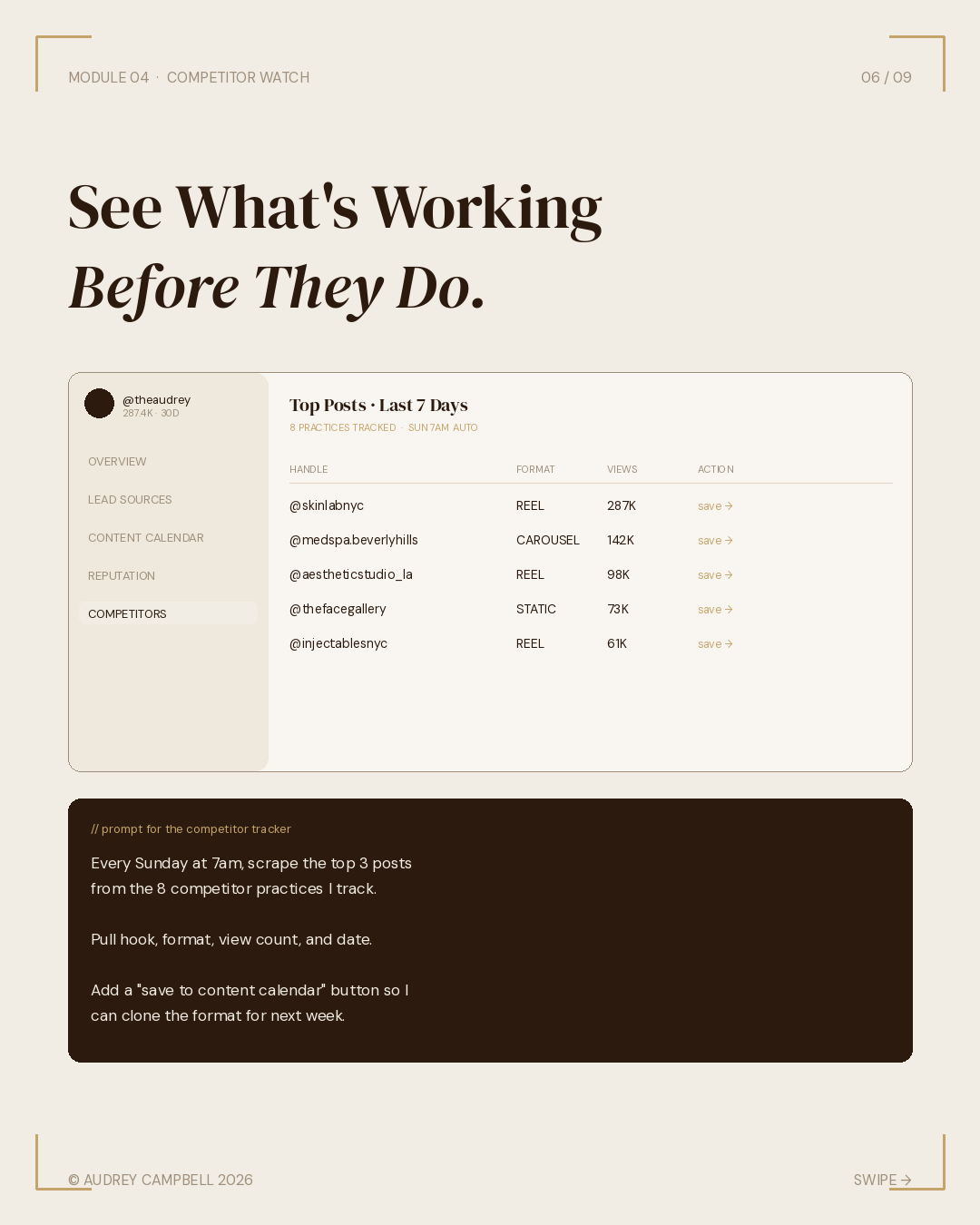
Claude does it weekly. Sunday morning, it scrapes the top three posts from each of the competitor accounts you track, pulls the hooks, pulls view counts, and surfaces the patterns. You read it with coffee, decide what to test, and the patterns go into next week's content calendar.
// PROMPT FOR THE COMPETITOR TRACKER
Build the Competitor Watch page.Every Sunday at 7am, scrape the top 3 posts from these 8 competitor practices: [I'll paste the list].For each post: pull the hook, the format (reel, carousel, static), the view count, and the date.Show them sorted by view count with a one-line note on what made each one work. Add a "save to content calendar" button so I can clone the format for next week.
The point is not to copy. The point is to see what's resonating across the category, and to make decisions about your content with that context in your head. Hook patterns travel. Format patterns travel. Specifics never should.
The stack
Most posts about AI in aesthetics tell you to "use AI." This one names the stack.
The model
Claude Opus for the build sessions: voice training, dashboard architecture, prompt design. Claude Sonnet for daily runs: review responses, calendar drafts, competitor digests. One subscription, two modes.
The connectors, mapped to modules
Each connector exists for a specific module. The point is not to turn on eight things. The point is that every piece of the stack does something Claude could not do alone.
FOR MODULE 01 · LEAD SOURCE ATTRIBUTION
The CRM is where attribution actually lives. Two paths, depending on what you run:
- HubSpot — if you run real marketing ops. Official Claude connector, free OAuth. Lets Claude track contact lifecycle, analyze deal win/loss, pull contact records on demand.
- GoHighLevel — if you run an aesthetic-native CRM. Official MCP server launched early 2026 with 39 tools covering contacts, pipelines, calendars, and conversations. Most practices already on GHL can plug Claude in directly.
FOR MODULE 02 · CONTENT CALENDAR
- Postiz (or PostFast) — native MCP server. Claude drives the scheduler instead of generating captions you paste somewhere else. Posts go to Instagram, TikTok, YouTube Shorts, LinkedIn, Threads, and twenty-plus more channels from one endpoint.
- Canva — official Claude connector. Claude drafts the post, generates the visual brief, hands it to Canva.
FOR MODULE 03 · REPUTATION PIPELINE
- Gmail — official connector. Powers the daily review alert queue.
- Notion or Google Drive — for voice samples and response templates. Notion if you want databases and structure. Drive if you want simple. Both have official Claude connectors.
FOR MODULE 04 · COMPETITOR WATCH
- Meta Ads MCP — official, launched April 2026. Twenty-nine tools covering live Instagram and Facebook competitor analytics, creative performance, and audience insights.
- Web search — built into Claude. Powers competitor analysis on anything that lives outside Meta.
The skills layer
- File creation — generates the CLAUDE.md project file, exports the weekly digest as CSV.
- Web search — powers competitor analysis between Meta MCP calls.
- Research mode — for the deeper monthly review, not the daily runs.
This is not eight tools. It is one model and a handful of connectors per module, chosen because each one does something Claude could not do alone.
Built once. Runs forever.
Most marketing tools require ongoing input to function. You log in. You configure. You upload. You schedule. You report. You log out. You forget. You start over next Monday.
This one requires one weekend of setup, then it operates on the inputs you've already given it. Your voice. Your competitors. Your standards. Codified.
What gets codified
Your voice. Three sample captions train the calendar and the review responses. The same voice writes every post and every reply, whether you wrote it or whether Claude drafted it for your approval.
Your competitors. Eight accounts feed the Sunday digest. You don't have to remember to check. The patterns come to you with coffee on Sunday morning.
Your standards. Your tags. Your sources. Your review thresholds. The rules that govern what gets auto-drafted versus what gets flagged for a human are yours, not the platform's.
What this isn't
This isn't autopilot. You still write the voice samples. You still pick the competitors. You still approve the review responses and decide which content goes live.
What changes is the leverage. The same hour of work, writing a caption, responding to a review, screenshotting a competitor reel, now produces a week of output instead of a single post.
That's the actual promise. Not AI replacing you. AI compounding what you already do.
Episode 02 preview
Next in the series: The Practice Command Center. Same build pattern, applied to operations: revenue, no-shows, retention, inventory, and the front desk. Different stack. Same thesis.
Subscribe to get it the day it drops.